Still banging my head against the wall on this, not sure why I'm not able to understand this.
Using the standalone generated WIE boot image.
Install Win11 25h2 OS, updates, etc., install TOEC and let it check in.
Run the TOEC imagine prep, using the bare minimum setup completion and unattend that you provide in the documentation copied to the server and loaded into the TOEC prep tool.
Boot from USB WIE and capture image.
Grab a second computer that is the same hardware. Boot from HBCD and wipe the drive. Boot from usb WIE type in computer name, deploy image. *I've shut off all the security for now, want to make sure that doesn't get in the way while I'm still trying to figure this out.
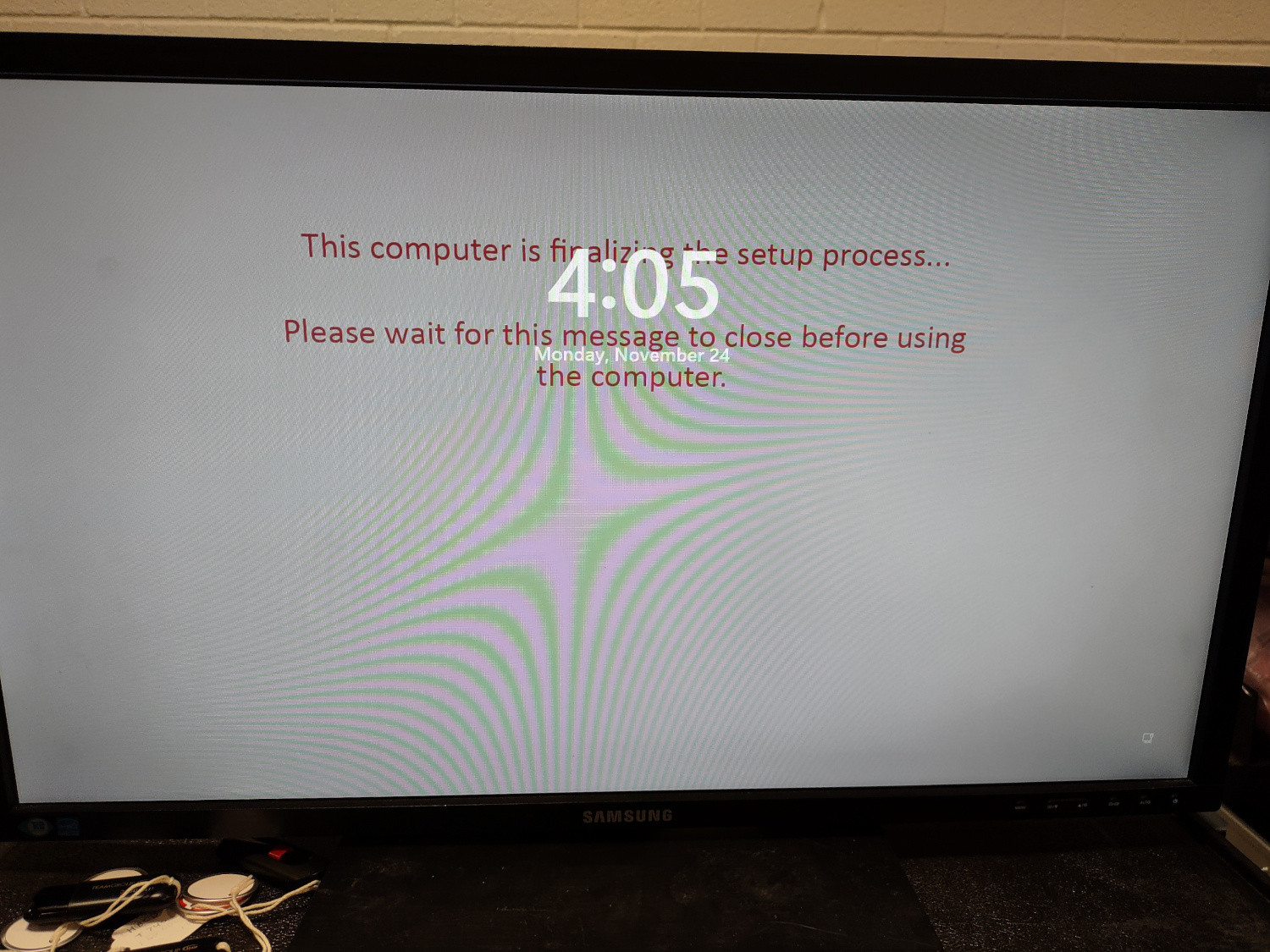
PC reboots, comes up to a Windows logo, I see an update message and then it tries to reboot, and I get the attached image. I let this wait overnight to see what would happen, but all it did was go into hibernate.
I can get logs, but they might be kind of worthless, I did a lot of clicking around and it seemed to fill up some of them.
I have both from the TOEC before I messed with things:
Service
2025-11-24 10:50:53,127 INFO [7] Host - Starting Toec Service

2025-11-24 10:50:54,054 INFO [4] ServiceInitialize - Toec Version: 1.5.7.0

2025-11-24 10:50:57,836 INFO [4] ServiceInitialize - Verifying Installation ID

2025-11-24 10:50:57,836 INFO [4] ServiceInitialize - Provision Status: 0

2025-11-24 10:50:57,839 INFO [4] ServiceInitialize - Installation ID: 3be7b004-0e1a-4ee9-af59-db6440ad3246

2025-11-24 10:50:57,839 INFO [4] ServiceInitialize - Verification Complete

2025-11-24 10:50:58,691 INFO [4] ServiceInitialize - Threshold Window Enabled.  Delaying For 21 Seconds.

2025-11-24 10:51:19,692 INFO [4] ServiceProvision - Verifying Client Provision Status

2025-11-24 10:51:19,723 INFO [4] ServiceProvision - Verification Complete

2025-11-24 10:51:20,186 INFO [4] ServiceAD - AD Computer Guid: 486f489b-b2ea-4607-b4c9-91b1d9e0dec0

2025-11-24 10:51:29,515 INFO [4] ServiceTriggerAction - Checking For Startup Policies

2025-11-24 10:51:29,936 INFO [4] PolicyRunner - No Policies For Trigger Startup Were Found For This Computer

2025-11-24 10:51:29,936 INFO [4] ServiceTriggerAction - Check In Time Set To 60

2025-11-24 10:51:29,936 INFO [4] ServiceTriggerAction - Trigger Action: Startup. Complete.

2025-11-24 10:59:18,650 INFO [7] Host - Starting Toec Service

2025-11-24 10:59:18,724 INFO [4] ServiceInitialize - Toec Version: 1.5.7.0

2025-11-24 10:59:22,286 INFO [4] ServiceInitialize - Verifying Installation ID

2025-11-24 10:59:22,288 INFO [4] ServiceInitialize - Provision Status: 8

2025-11-24 10:59:22,288 INFO [4] ServiceInitialize - Installation ID: 3be7b004-0e1a-4ee9-af59-db6440ad3246

2025-11-24 10:59:22,288 INFO [4] ServiceInitialize - Verification Complete

2025-11-24 10:59:22,831 INFO [4] ServiceInitialize - Threshold Window Enabled.  Delaying For 73 Seconds.

2025-11-24 11:00:35,845 INFO [4] ServiceProvision - Verifying Client Provision Status

2025-11-24 11:00:35,879 INFO [4] ServiceProvision - Verification Complete

2025-11-24 11:00:37,332 INFO [4] ServiceTriggerAction - Checking For Startup Policies

2025-11-24 11:00:37,635 INFO [4] PolicyRunner - No Policies For Trigger Startup Were Found For This Computer

2025-11-24 11:00:37,635 INFO [4] ServiceTriggerAction - Check In Time Set To 60

2025-11-24 11:00:37,635 INFO [4] ServiceTriggerAction - Trigger Action: Startup. Complete.

2025-11-24 16:32:46,696 INFO [7] Host - Starting Toec Service

2025-11-24 16:32:47,073 INFO [4] ServiceInitialize - Toec Version: 1.5.7.0

2025-11-24 16:32:50,811 INFO [4] ServiceInitialize - Verifying Installation ID

2025-11-24 16:32:50,811 INFO [4] ServiceInitialize - Provision Status: 0

2025-11-24 16:32:50,811 INFO [4] ServiceInitialize - Installation ID:

2025-11-24 16:32:50,811 INFO [4] ServiceInitialize - Generating New Installation ID

2025-11-24 16:32:50,826 INFO [4] ServiceInitialize - Verification Complete

2025-11-24 16:32:51,842 INFO [4] ServiceInitialize - Threshold Window Enabled.  Delaying For 90 Seconds.

2025-11-24 16:34:22,212 INFO [7] Host - Starting Toec Service

2025-11-24 16:34:22,258 INFO [4] ServiceInitialize - Toec Version: 1.5.7.0

2025-11-24 16:34:25,891 INFO [4] ServiceInitialize - Verifying Installation ID

2025-11-24 16:34:25,906 INFO [4] ServiceInitialize - Provision Status: 0

2025-11-24 16:34:25,906 INFO [4] ServiceInitialize - Installation ID: cefb821d-5d47-410b-ab92-eb7a3ff86e7f

2025-11-24 16:34:25,906 INFO [4] ServiceInitialize - Verification Complete

2025-11-24 16:34:26,350 INFO [4] ServiceInitialize - Threshold Window Enabled.  Delaying For 64 Seconds.

2025-11-24 16:34:29,517 INFO [7] Host - Starting Toec Service

2025-11-24 16:34:29,549 INFO [4] ServiceInitialize - Toec Version: 1.5.7.0

2025-11-24 16:34:32,151 INFO [4] ServiceInitialize - Verifying Installation ID

2025-11-24 16:34:32,151 INFO [4] ServiceInitialize - Provision Status: 0

2025-11-24 16:34:32,161 INFO [4] ServiceInitialize - Installation ID: cefb821d-5d47-410b-ab92-eb7a3ff86e7f

2025-11-24 16:34:32,161 INFO [4] ServiceInitialize - Verification Complete

2025-11-24 16:34:32,579 INFO [4] ServiceInitialize - Threshold Window Enabled.  Delaying For 71 Seconds.

2025-11-24 16:35:43,600 INFO [4] ServiceProvision - Verifying Client Provision Status

2025-11-24 16:35:43,614 INFO [4] ServiceProvision - Verification Complete

2025-11-24 16:35:43,774 ERROR [4] ServiceAD - Active Directory Search Failed:

2025-11-24 16:35:43,774 ERROR [4] ServiceAD - Current security context is not associated with an Active Directory domain or forest.

2025-11-24 16:35:47,842 INFO [4] ServiceTriggerAction - Checking For Startup Policies

2025-11-24 16:35:48,150 INFO [4] PolicyRunner - No Policies For Trigger Startup Were Found For This Computer

2025-11-24 16:35:48,150 INFO [4] ServiceTriggerAction - Check In Time Set To 60

2025-11-24 16:35:48,150 INFO [4] ServiceTriggerAction - Trigger Action: Startup. Complete.

2025-11-25 09:06:51,682 INFO [89] ServiceSocket - Could Not Connect To Web Socket

2025-11-25 09:06:51,682 ERROR [89] ServiceSocket - System.Net.Http.HttpRequestException: An error occurred while sending the request. ---> System.Net.WebException: Unable to connect to the remote server ---> System.Net.Sockets.SocketException: A socket operation was attempted to an unreachable host 172.30.0.40:8888

   at System.Net.Sockets.Socket.InternalEndConnect(IAsyncResult asyncResult)

   at System.Net.Sockets.Socket.EndConnect(IAsyncResult asyncResult)

   at System.Net.ServicePoint.ConnectSocketInternal(Boolean connectFailure, Socket s4, Socket s6, Socket& socket, IPAddress& address, ConnectSocketState state, IAsyncResult asyncResult, Exception& exception)

   --- End of inner exception stack trace ---

   at System.Net.HttpWebRequest.EndGetResponse(IAsyncResult asyncResult)

   at System.Net.Http.HttpClientHandler.GetResponseCallback(IAsyncResult ar)

   --- End of inner exception stack trace ---

2025-11-25 09:06:51,683 INFO [89] ServiceSocket - Server Push Events Will Not Be Available

2025-11-25 09:08:21,640 INFO [7] Host - Starting Toec Service

2025-11-25 09:08:21,708 INFO [4] ServiceInitialize - Toec Version: 1.5.7.0

2025-11-25 09:08:24,491 INFO [4] ServiceInitialize - Verifying Installation ID

2025-11-25 09:08:24,494 INFO [4] ServiceInitialize - Provision Status: 8

2025-11-25 09:08:24,494 INFO [4] ServiceInitialize - Installation ID: cefb821d-5d47-410b-ab92-eb7a3ff86e7f

2025-11-25 09:08:24,494 INFO [4] ServiceInitialize - Verification Complete

2025-11-25 09:08:25,126 INFO [4] ServiceInitialize - Threshold Window Enabled.  Delaying For 48 Seconds.

2025-11-25 09:09:13,136 INFO [4] ServiceProvision - Verifying Client Provision Status

2025-11-25 09:09:13,152 INFO [4] ServiceProvision - Verification Complete

2025-11-25 09:09:15,186 INFO [4] ServiceTriggerAction - Checking For Startup Policies

2025-11-25 09:09:15,630 INFO [4] PolicyRunner - No Policies For Trigger Startup Were Found For This Computer

2025-11-25 09:09:15,632 INFO [4] ServiceTriggerAction - Check In Time Set To 60

2025-11-25 09:09:15,632 INFO [4] ServiceTriggerAction - Trigger Action: Startup. Complete.

2025-11-25 09:10:06,621 INFO [7] Host - Starting Toec Service

2025-11-25 09:10:06,688 INFO [4] ServiceInitialize - Toec Version: 1.5.7.0

2025-11-25 09:10:09,338 INFO [4] ServiceInitialize - Verifying Installation ID

2025-11-25 09:10:09,338 INFO [4] ServiceInitialize - Provision Status: 8

2025-11-25 09:10:09,338 INFO [4] ServiceInitialize - Installation ID: cefb821d-5d47-410b-ab92-eb7a3ff86e7f

2025-11-25 09:10:09,338 INFO [4] ServiceInitialize - Verification Complete

2025-11-25 09:10:09,574 INFO [4] ServiceInitialize - Threshold Window Enabled.  Delaying For 76 Seconds.
tray
2025-11-24 10:59:39,960 INFO [1] Program - Tray App Started

2025-11-24 10:59:39,967 INFO [1] Program - Current User: greg

2025-11-24 10:59:44,470 ERROR [1] ApiRequest - Error Retrieving API Response: System.Net.WebException: Unable to connect to the remote server ---> System.Net.Sockets.SocketException: No connection could be made because the target machine actively refused it 127.0.0.1:1415

   at System.Net.Sockets.Socket.DoConnect(EndPoint endPointSnapshot, SocketAddress socketAddress)

   at System.Net.ServicePoint.ConnectSocketInternal(Boolean connectFailure, Socket s4, Socket s6, Socket& socket, IPAddress& address, ConnectSocketState state, IAsyncResult asyncResult, Exception& exception)

   --- End of inner exception stack trace ---

   at System.Net.HttpWebRequest.GetResponse()

   at RestSharp.Http.<ExecuteRequest>g__GetRawResponse|185_1(WebRequest request)

at RestSharp.Http.ExecuteRequest(String httpMethod, Action1 prepareRequest)
2025-11-24 10:59:58,521 ERROR [1] ApiRequest - Error Retrieving API Response: System.Net.WebException: Unable to connect to the remote server ---> System.Net.Sockets.SocketException: No connection could be made because the target machine actively refused it 127.0.0.1:1415
at System.Net.Sockets.Socket.DoConnect(EndPoint endPointSnapshot, SocketAddress socketAddress)
at System.Net.ServicePoint.ConnectSocketInternal(Boolean connectFailure, Socket s4, Socket s6, Socket& socket, IPAddress& address, ConnectSocketState state, IAsyncResult asyncResult, Exception& exception)
--- End of inner exception stack trace ---
at System.Net.HttpWebRequest.GetResponse()
at RestSharp.Http.<ExecuteRequest>gGetRawResponse|185_1(WebRequest request)
at RestSharp.Http.ExecuteRequest(String httpMethod, Action1 prepareRequest)
2025-11-24 11:00:12,571 ERROR [1] ApiRequest - Error Retrieving API Response: System.Net.WebException: Unable to connect to the remote server ---> System.Net.Sockets.SocketException: No connection could be made because the target machine actively refused it 127.0.0.1:1415
at System.Net.Sockets.Socket.DoConnect(EndPoint endPointSnapshot, SocketAddress socketAddress)
at System.Net.ServicePoint.ConnectSocketInternal(Boolean connectFailure, Socket s4, Socket s6, Socket& socket, IPAddress& address, ConnectSocketState state, IAsyncResult asyncResult, Exception& exception)
--- End of inner exception stack trace ---
at System.Net.HttpWebRequest.GetResponse()
at RestSharp.Http.<ExecuteRequest>g__GetRawResponse|185_1(WebRequest request)
at RestSharp.Http.ExecuteRequest(String httpMethod, Action1 prepareRequest)
2025-11-24 11:00:26,624 ERROR [1] ApiRequest - Error Retrieving API Response: System.Net.WebException: Unable to connect to the remote server ---> System.Net.Sockets.SocketException: No connection could be made because the target machine actively refused it 127.0.0.1:1415
at System.Net.Sockets.Socket.DoConnect(EndPoint endPointSnapshot, SocketAddress socketAddress)
at System.Net.ServicePoint.ConnectSocketInternal(Boolean connectFailure, Socket s4, Socket s6, Socket& socket, IPAddress& address, ConnectSocketState state, IAsyncResult asyncResult, Exception& exception)
--- End of inner exception stack trace ---
at System.Net.HttpWebRequest.GetResponse()
at RestSharp.Http.<ExecuteRequest>gGetRawResponse|185_1(WebRequest request)
at RestSharp.Http.ExecuteRequest(String httpMethod, Action1 prepareRequest)
2025-11-24 11:00:37,111 INFO [1] ServiceTriggerAction - Checking For Login Policies
2025-11-24 11:00:37,396 INFO [1] PolicyRunner - No Policies For Trigger Login Were Found For This Computer
2025-11-24 11:00:37,396 INFO [1] ServiceTriggerAction - Trigger Action: Login. Complete.
Any other logs I can get? I've tried with both secure boot on, and secure boot off to see if that was getting in the way.
I'm also getting another problem that might be related. When I wipe the drives, the deployment comes up with a big red warning about the drives being unformatted (or something), it then seems like it goes through and creates the partitions, but it fails copying the files and reboots. Second time around it is able to complete the partitions and copying the files.
I'm probably going to get the LIE configured and make a fresh client install and see what happens. I'm guessing some of this might be a Win11 25h2 issue, but some of this is me not understanding something and I'm just not getting it. I've watched the videos at least 3 times, and been through the documents more than that.